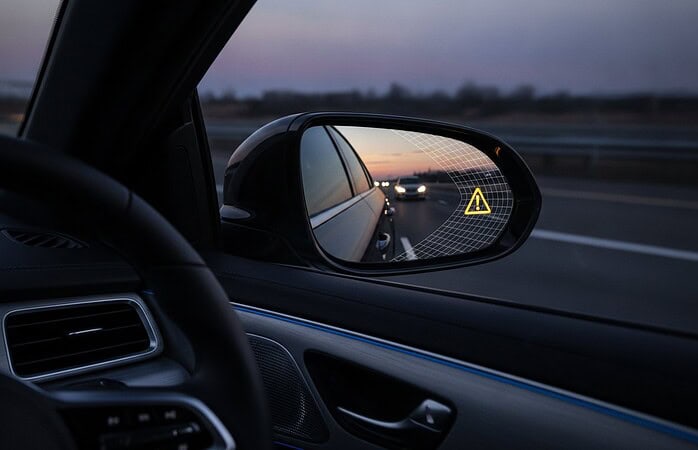
Can a warning make you safer on the road, or simply more confident than you should be? It’s a fair question. Blind-spot alerts, backup cameras, and other driver aids can make everyday driving feel less demanding, but they can’t detect every hazard or make decisions for you. The key to feeling safer on the road with driver aids is understanding what each system does and staying ready to act for yourself.
It’s understandable to wonder whether these features provide practical safety support or move a vehicle closer to self-driving. Most driver aids assist an attentive driver rather than replace one. Cameras and detection systems can help with tasks such as reversing or checking nearby traffic. A dash camera has a different role: it records events rather than preventing them.
This guide explains where driver aids can help, where their limits matter, and how alerts can affect attention. It also covers useful camera and detection upgrades, including how professional integration can make technology easier to use in your vehicle. The goal is greater awareness and confidence without handing over your attention.
Key Takeaways
- See how cameras and alerts can support everyday tasks like reversing and changing lanes, while leaving the final judgment to you.
- Understand the difference between a warning, added visibility, and a system that controls vehicle movement.
- Learn why driver aids may support awareness but can also encourage overconfidence, and what the IIHS finding about driver preference does and doesn’t tell us.
- Build a simple routine for feeling safer on the road with driver aids: learn each feature, pay attention to its alerts, and keep using mirrors and direct observation.
- Explore how professionally integrated backup cameras, blind-spot detection, and dash cameras can provide practical support tailored to your vehicle and needs.
How driver aids can help you feel safer on the road
Reversing out of a tight driveway can leave you wondering what’s hidden behind the vehicle. Changing lanes in busy traffic raises a different question: is another car just outside your view? These everyday moments help explain why drivers value assistance technology. A camera can add visibility, while a detection system can provide an extra alert. Neither removes the need to look, assess, and respond.
A driver aid supports a task while the driver remains responsible. These technologies can improve awareness or, in some vehicles, assist with aspects of vehicle control. That’s different from fully autonomous driving, where an automated driving system performs the driving task. Driver assistance doesn’t mean the vehicle can drive itself. For a broader technical overview, see Advanced Driver-Assistance Systems (ADAS).
What counts as a driver aid in everyday driving?
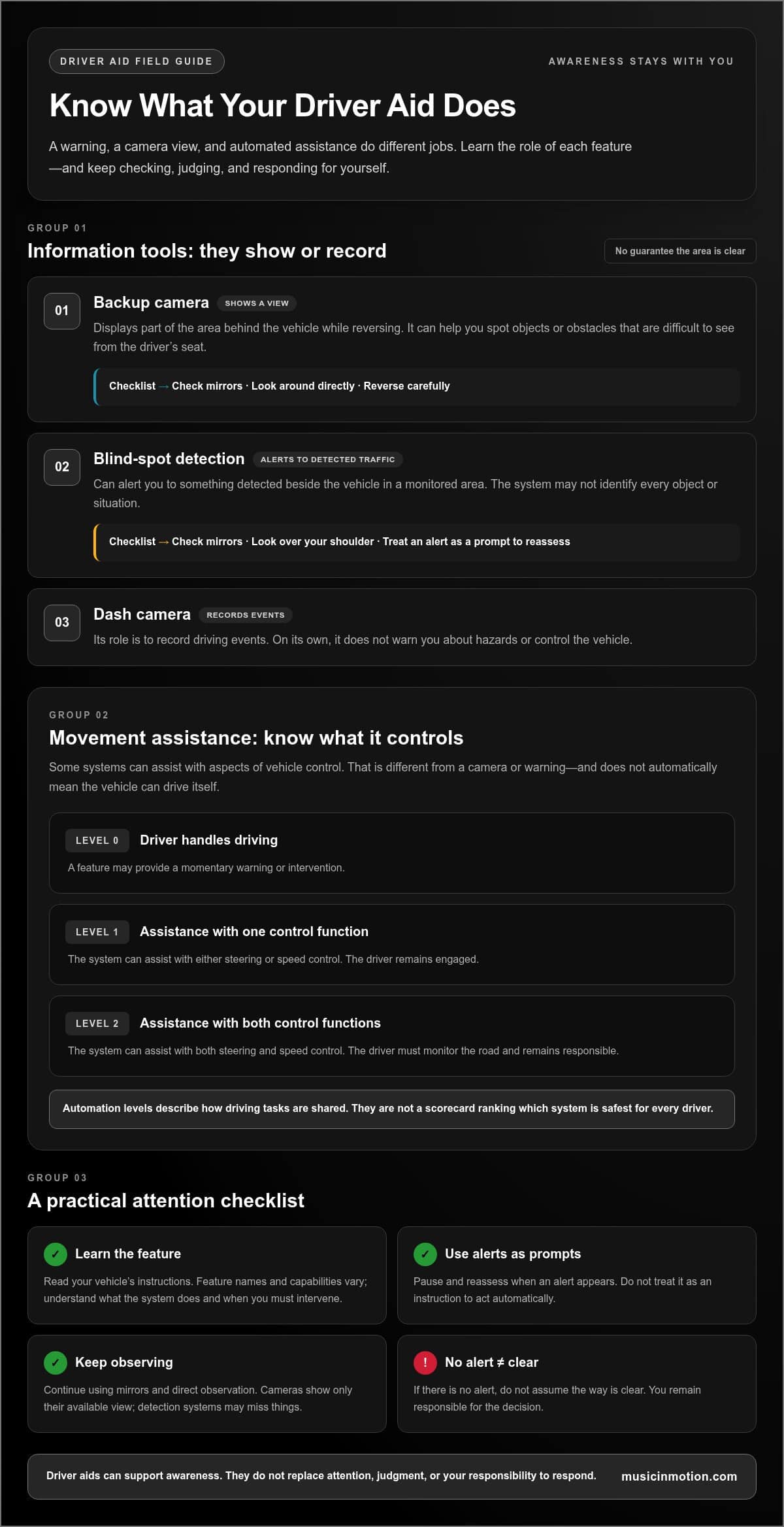
Backup cameras show the area behind a vehicle while reversing. The image can help you spot objects or obstacles that are difficult to see from the driver’s seat, but it shows only part of your surroundings. Check your mirrors, look around directly, and reverse carefully.
Blind-spot detection systems alert you when they detect something beside the vehicle in a monitored area. The alert can draw your attention to nearby traffic, but it doesn’t replace checking mirrors and looking over your shoulder before changing lanes. A dash camera serves another purpose: it records driving events. On its own, it doesn’t warn you about hazards or control the vehicle.
Why assistance can change how driving feels
Uncertainty can make familiar maneuvers stressful. A camera view may help you judge the space behind the vehicle, while a blind-spot alert can prompt you to pause and reassess before moving over. These aids can offer another piece of information, but they can’t make every situation predictable.
That extra information can make feeling safer on the road with driver aids a practical goal, not a reason to switch off your attention. Cameras show only the view available to them, and detection systems may not identify every object or situation. Conditions, obstructions, and system design all matter. Treat an alert as a prompt to check, not an instruction to act automatically. If there’s no alert, don’t assume the way is clear. Technology can support your awareness, but you remain responsible for the decision.
How driver assistance works, and where automation levels fit
A warning, a camera view, and automated steering do different jobs. A blind-spot alert draws attention to a vehicle the system detects; a backup camera provides an image of the area behind you. Neither moves the vehicle. Other systems can control parts of driving, such as steering or speed. Knowing which kind of support you’re using helps set realistic expectations and keeps your attention on the road.
A driver alert tells you what a system detects; a camera adds a view; an assistance system may steer, brake, or accelerate, but you remain responsible for driving unless the vehicle is operating under a system designed to take over that role. Feature names and capabilities vary, so a label alone doesn’t explain exactly what a feature does. Read your vehicle’s instructions to understand its limits and when you must intervene.
Alerts, cameras, and automated assistance are not the same
A blind-spot alert warns you about traffic detected alongside your vehicle. A backup camera shows the area behind you as you reverse. Both provide information for you to assess, and neither guarantees that an area is clear. A dash camera has a separate role: it records driving events rather than warning you or controlling a driving task.
Partial automation goes further by controlling some vehicle movement. Depending on the system, it may assist with steering, acceleration, or braking. That doesn’t mean the vehicle is self-driving. Drivers using these features must monitor the road and stay ready to respond. The IIHS overview of driver-assistance features and crash evidence provides context on how specific technologies are studied. Findings about individual features shouldn’t be read as a promise about every system or situation.
What NHTSA automation levels tell drivers
The National Highway Traffic Safety Administration (NHTSA) uses automation levels to describe how driving tasks are shared between the driver and technology. The levels explain the role expected of the person behind the wheel. They aren’t a scorecard ranking which system is safest for every driver.
- Level 0: The driver handles driving, though a feature may provide a momentary warning or intervention.
- Level 1: A system can assist with either steering or speed control, while the driver remains engaged.
- Level 2: A system can assist with both steering and speed control, but the driver must monitor the road and remain responsible.
At higher levels, the system takes on more of the driving task, and the expected driver role changes. That doesn’t mean those capabilities are broadly available or that every feature marketed with similar language works the same way. Use NHTSA’s current automated vehicle guidance and your vehicle’s manual to understand the distinction. Music In Motion integrates backup cameras and blind-spot detection for practical support tailored to a vehicle, while keeping the driver’s role clear.
Do driver aids make driving safer, or can they create overconfidence?
Driver aids can provide useful information, but their presence alone doesn’t make a drive safe. A camera may add visibility, a detection system may issue an alert, and a dash camera may record what happened. The benefit depends on the feature, how it’s used, and the situation around the vehicle. A driver aid can support safer decisions, but it can’t guarantee a safe outcome.
That distinction matters because reassurance can turn into reliance. If a driver assumes an alert will catch every hazard or treats a camera image as a complete view, they may stop checking for themselves. Research from the Federal Highway Administration examines how drivers adapt to assistance technologies over time, including questions related to driver overconfidence. Use an aid as one source of information, not as a reason to relax your attention.
The benefits and limits drivers should weigh
Depending on the system, driver aids can offer added visibility, a warning, or a recording of driving events. Each serves a different purpose. A camera presents a view; an alert draws attention to something the system detects; a dash camera records rather than intervenes. None gives you a complete picture of every possible hazard.
Cameras and detection systems have limits. A camera may not show everything around the vehicle, and a sensor may not identify every relevant object or situation. Keep using mirrors and direct observation, including shoulder checks before changing lanes. Match your speed to the conditions and remain alert, whether or not a warning appears. Treat an alert as a prompt to assess, not a command to act.
Why correction and driver understanding matter
Kelley Blue Book reported an IIHS study finding that drivers preferred partial-automation systems they could correct without turning the system off. That finding describes driver preference, not proof that those systems prevent crashes or that every driver will use them safely. A preference for retaining control is meaningful, but it shouldn’t be mistaken for a safety outcome.
Unfamiliar indicators or alerts can distract, especially when you’re trying to interpret them in busy traffic. Misunderstanding a feature can also invite overconfidence: you might expect assistance with a task the system doesn’t perform. Before relying on an aid, learn what its signals mean, what it can control, and when it may stop assisting. Read the vehicle’s instructions and become familiar with the feature in a low-pressure setting. Feeling safer on the road with driver aids starts with understanding their boundaries and keeping your judgment engaged.
How to use driver aids as support on everyday drives
A useful routine starts before you’re in traffic. Learn what each feature is designed to do, set it up according to its instructions, recognize its alerts, and stay engaged every time you drive. This makes feeling safer on the road with driver aids a matter of informed use, not blind trust.
A simple routine for using assistance responsibly
- Learn the feature. Read the vehicle or system instructions so you know what an alert means, what area a camera shows, and what the technology cannot do.
- Set it up while parked. Follow product-specific guidance to adjust camera views or alert settings. Setup varies by system, so don’t make adjustments while driving.
- Pay attention to what it tells you. Notice alerts and indicators without assuming they’ll identify every hazard. If a warning is unclear, check the instructions when it’s safe to do so.
- Keep driving actively. Use mirrors and direct observation alongside camera views and blind-spot alerts. Assess the situation yourself before reversing, changing lanes, or taking other action.
The routine is simple, but the details matter. A camera’s view and an alert’s meaning depend on the system installed. Learn how the setup works before relying on it during a demanding maneuver. If you’re comparing ways to combine upgrades, our vehicle safety systems guide offers a broader look at available support.
Match the aid to the driving situation
Use each feature for the task it’s designed to support, while keeping your attention on the full driving task:
- Reversing: Use the backup-camera view as an added source of information. Continue checking your mirrors and surroundings directly, and move carefully.
- Changing lanes: Treat a blind-spot alert as a prompt to check, not permission to merge. Check your mirrors and make a direct visual check before moving over.
- Reviewing an event: Dash-camera footage can provide a record of driving events, but it isn’t a real-time collision-prevention feature. Keep your focus on the road, not on reviewing footage while driving.
Professional integration can make cameras and detection systems easier to use in the vehicle, but it doesn’t replace attentive driving. Music In Motion installs backup cameras, blind-spot detection, and dash cameras with practical use in mind. Explore driver-safety technology installation for support tailored to your vehicle and driving needs.
How professionally integrated driver aids can support confidence
Understanding what a driver aid can and can’t do is the first step. The next is choosing technology that suits your vehicle and everyday needs. A camera or detection system is most useful when its information is accessible and its role is clear. Professional installation can bring individual components together in a practical setup, but it can’t guarantee safety or replace attentive driving.
Choosing useful visibility and awareness upgrades
The right upgrade depends on the task you want help with. A backup camera provides a view behind the vehicle while maneuvering or reversing, which can add visibility when the driver’s view is limited. It remains one view, so use it alongside mirrors and direct checks, not instead of them.
Blind-spot detection adds an alert for nearby traffic the system detects. That prompt can support awareness during lane changes, while you continue to check your mirrors and look directly before moving over. A dash camera serves a different need: it records driving events for later review. It isn’t an active assistance system and doesn’t prevent a collision while recording, but reliable hardware is essential if you want dependable footage; to explore dedicated recording options, discover MUFU Technology Co., Ltd..
From individual devices to a finished installation
A useful installation takes into account the vehicle, how it’s used, and what the driver wants help seeing or recording. A setup that suits one vehicle or routine may not suit another. Music In Motion professionally installs backup cameras and sensors, integrates blind-spot detection systems, and installs dash cameras across different vehicle types. The focus is practical function and a clean, finished result, not simply adding hardware.
Careful integration can make technology easier to use as part of a familiar driving routine. Drivers still need to understand the system, recognize its limits, and make their own decisions. Feeling safer on the road with driver aids means combining helpful technology with clear expectations and active attention behind the wheel.
If added visibility, lane-awareness support, or event recording would be useful in your vehicle, explore driver-safety installation options from Music In Motion.
Make driver aids work with your attention
Driver aids can add useful visibility and timely alerts, but they don’t replace your judgment or guarantee a safer outcome. Understand what each feature does, follow its instructions, and stay engaged behind the wheel. That’s the foundation for feeling safer on the road with driver aids.
The right technology depends on the support you need. Backup cameras and sensors can assist with rear visibility, blind-spot detection can add an alert, and dash cameras can record driving events. Thoughtful integration helps make those tools practical to use in your vehicle. You remain responsible for checking your surroundings and deciding when it’s safe to act.
At Music In Motion, we professionally install backup cameras and sensors, blind-spot detection systems, and dash cameras, with custom integration focused on a useful, finished result. If you’re considering an upgrade, explore professionally installed driver-safety technology.
With useful support and your attention firmly on the drive, you can build confidence one informed choice at a time. To ensure your vehicle remains in peak mechanical condition alongside modern driver aids, find out more about expert automotive maintenance and servicing solutions.
Frequently Asked Questions
Do driver assistance systems actually make driving safer?
They can support safer decisions, but they don’t automatically make every drive or driver safer. A backup camera may add visibility while reversing, and a blind-spot alert may prompt you to check nearby traffic. The benefit depends on the system, conditions, and how you use it. Feeling safer on the road with driver aids should come from better awareness, not from assuming technology can handle every hazard.
Can driver aids prevent a car crash?
Some driver-assistance systems are designed to warn about hazards or intervene in certain situations, which may help a driver avoid a collision. But no aid can guarantee crash prevention. Cameras and sensors have limits, and you may need to respond quickly when conditions change. Keep a safe speed, stay alert, and treat a warning as information to assess, not proof that the system will prevent an impact.
Are driver assistance systems the same as self-driving cars?
No. Driver assistance supports a person who remains responsible for driving, even if a system helps control steering or speed. A self-driving system is designed to perform the driving task under its operating conditions. The feature name alone doesn’t tell you what a vehicle can do. Read the vehicle’s instructions to understand what the system controls, where it works, and when you must take action.
Can blind-spot detection replace checking over your shoulder?
No. Blind-spot detection can alert you to traffic the system detects beside your vehicle, but it’s an extra check, not clearance to change lanes. Continue using your mirrors and looking over your shoulder before moving over. Don’t assume the path is clear just because there’s no alert. The system’s detection area and performance depend on its design and conditions, so follow its instructions and stay attentive.
Do backup cameras make reversing completely safe?
No. A backup camera adds a view behind the vehicle, but it may not show everything around you. Use the screen alongside your mirrors and direct observation, and reverse carefully enough to respond to what you see. Check the area around the vehicle before moving, too. A camera is a visibility aid, not a substitute for careful maneuvering or a guarantee that the way is clear.
Can driver aids distract drivers or create overconfidence?
Yes. Unfamiliar alerts can draw attention away from driving, and assuming a system will detect every hazard can lead to overconfidence. Learn what each indicator means and what the feature can and can’t do before relying on it in traffic. Set up cameras or alerts while parked, following system instructions. Keep your attention on the road, use direct observation, and make your own decisions even when an aid is active.