A stereo upgrade can look straightforward until the dash trim and wiring come into play. The right instructions depend on your 4Runner’s model and stereo setup. The process covers removing the panels, connecting the new stereo harness, and reinstalling the trim.
It’s reasonable to want a modern listening experience without damaging older interior panels or ending up with loose connections. A careful, step-by-step approach helps you understand how the factory stereo is mounted and where to take care during removal.
We’ll walk through the tools and preparation, explain how to remove the lower dash, glove box, and center-console panels, then cover wiring, stereo mounting, and trim reassembly. You’ll also see where single-DIN and double-DIN installations differ, plus practical details that can help you plan the job and avoid common snags.
Key Takeaways
- The panel-removal and stereo-install steps apply to Toyota 4Runner model years 1984 through 1995.
- Handle the HVAC controller panel carefully; its plastic can break during removal.
- Match the labeled adapter wires to the stereo harness, then connect the speaker, power, and antenna leads.
- Look beneath the round caps on both sides of the center-console pocket panel for the push tabs that release it.
- Before reinstalling trim, make sure wiring is secure and panels and connectors are back in place.
Applicable 4Runner model years
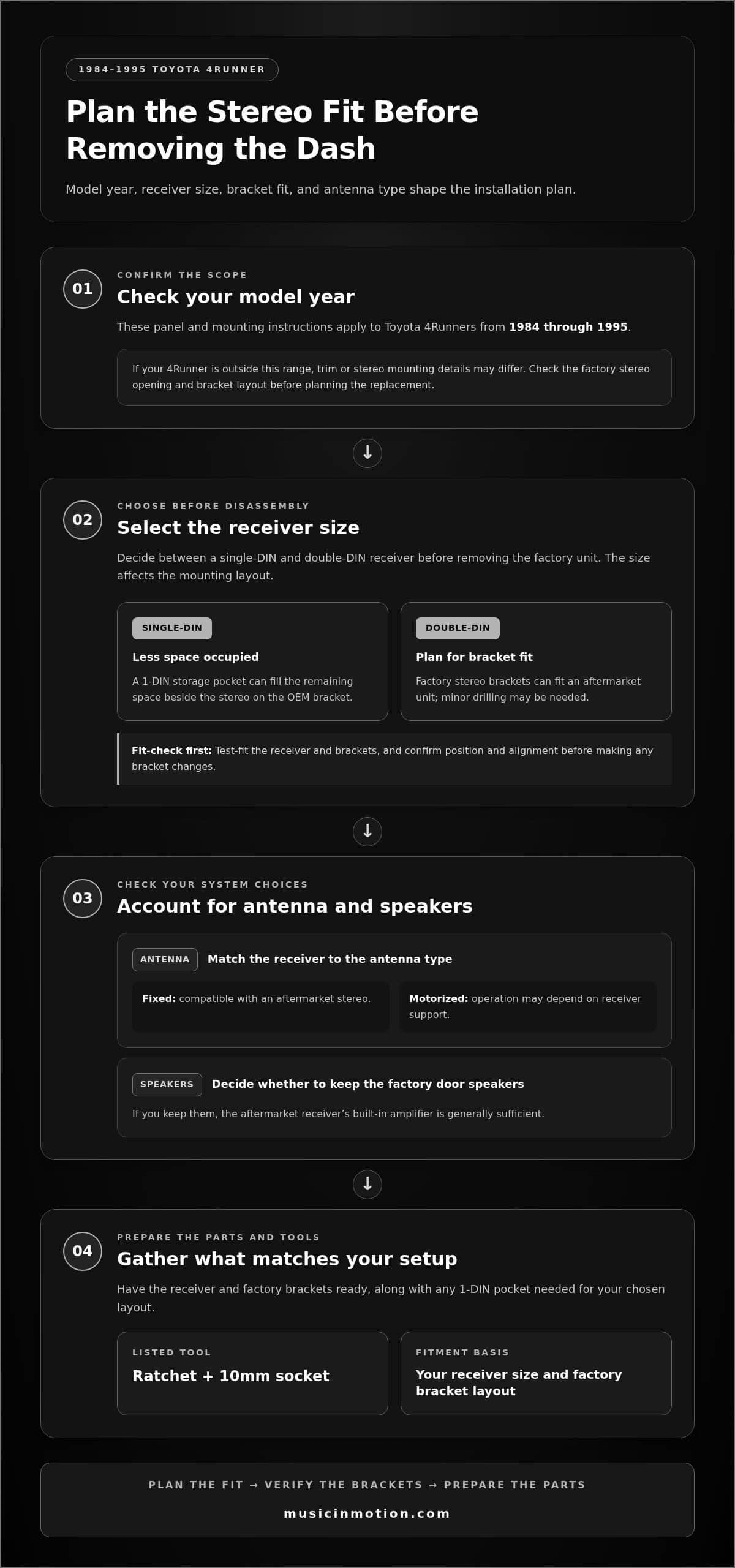
- Start by identifying your 4Runner’s model year. This guide applies to Toyota 4Runners from model years 1984 through 1995. For a Toyota 4Runner aftermarket stereo install, use this range to judge whether these panel and mounting instructions fit your vehicle. A 4Runner outside those years may have different trim or stereo mounting details, so don’t assume the removal steps are identical.
Before taking anything apart, look at the factory stereo opening and its mounting arrangement. The brackets influence how the replacement unit fits. Decide on a receiver size first, then plan the installation around the opening and bracket layout in your vehicle.
- Choose between a single-DIN and double-DIN receiver before removing the factory unit. A single-DIN stereo occupies less space. On the OEM bracket, a 1-DIN storage pocket can fill the remaining space beside the stereo. This gives the installation a finished layout without leaving an open section beside the receiver.
Inspect the factory brackets and note their mounting points. A Toyota 4Runner forum member reported that factory stereo brackets had mounting holes for a 1-DIN stereo. Use the brackets in your vehicle as the basis for test-fitting, rather than assuming the new unit will attach without adjustment.
- For a double-DIN receiver, plan to use the factory stereo brackets. They can fit an aftermarket unit, although minor drilling may be needed. Test-fit the receiver and brackets before making any changes. Confirm the position and alignment first so adjustments support a clean fit.
Receiver size affects the mounting work. A single-DIN setup may use a storage pocket, while a double-DIN setup may require bracket adjustment. Keep that difference in mind when selecting parts and preparing to reinstall the trim.
- Consider the antenna type when choosing a replacement stereo. A fixed antenna is compatible with an aftermarket stereo. A motorized antenna may depend on receiver support, so include its operation in your setup plan and make sure the connection suits the receiver.
Decide whether to keep the factory door speakers. If you do, the aftermarket receiver’s built-in amplifier is generally sufficient. This can simplify the system plan, since the receiver may power the speakers without an additional amplifier.
- Gather the parts and tools for your chosen configuration before disassembly. The listed tools include a ratchet with a 10mm socket. Have the receiver, factory brackets, and any needed 1-DIN pocket ready. A Toyota 4Runner aftermarket stereo install is easier to plan when these parts match the stereo size and existing mounting layout.
Use the model year, receiver size, bracket fit, and antenna type together. These details shape the installation plan for a 1984 through 1995 4Runner. Sorting them out first helps you prepare for panel removal and a secure, aligned stereo fit.
Care when removing the HVAC controller panel
- Identify the HVAC controller panel before pulling at the center dash. Its plastic is flimsy and can break during removal. Treat it as a delicate trim piece, not a handle. Release its retaining points without bending the panel, and set removed trim somewhere clear where it won’t be stepped on or pressed beneath tools.
Study the panel’s edges and seams first. Note where it meets adjacent trim and where you can reach behind it. Work along the panel rather than pulling one corner outward. This helps you spot uneven movement early and keep control of the panel.
- Use a plastic trim tool to gently lever an accessible panel edge. Apply light, controlled pressure at the seam, and avoid using the HVAC knobs as handles. If the edge starts to move, continue gradually along the seam instead of forcing the same spot.
Keep metal tools away from visible trim. A screwdriver can slip, scratch the finish, or concentrate force on thin plastic. If a plastic tool won’t release an edge with gentle pressure, pause and reassess its position. More force can turn a small snag into a cracked panel.
- Support the HVAC controller panel as soon as it starts to loosen. Hold the face evenly and ease it forward without twisting. If one corner moves ahead of the other, the plastic can strain. Watch the perimeter as you work. If a section stays firmly attached, stop pulling and find what is holding it.
Keep your fingers near the panel’s outer edges, not behind its controls. This grip improves control and reduces pressure on the knobs. Move slowly enough to notice changing resistance. The panel should come forward steadily, not spring loose after a hard tug.
- Once the HVAC panel loosens, don’t let it hang by connected wiring. Support its weight while checking behind it. If there’s a connector, release it at the plug rather than pulling the wires. Keep the panel close to the dash to limit strain and prevent contact with nearby parts.
Place the removed panel face-up on a clean, stable surface. Keep screws and small trim pieces separate from the HVAC controls. Inspect the panel before reinstallation, paying attention to cracked edges or damaged retaining points that could affect how securely it sits.
- To reinstall the HVAC controller panel, align it with the original opening before pressing. Check that wiring is clear of the edges and connectors are secure. Apply even pressure around the perimeter. If one side won’t sit flush, ease the panel back and correct its alignment rather than pressing harder.
Take the same careful approach if the panel feels loose or resists removal. For help with delicate dash trim during a stereo installation, consider having the work handled professionally. A measured touch protects the HVAC panel and keeps the surrounding dashboard looking clean.
Connecting the stereo wiring harness
Keeping steering wheel controls, a backup camera, and factory USB ports requires compatible interfaces between those functions and the replacement stereo. The receiver must also support the connections you want to retain.
- Identify the vehicle-side plugs before joining any wires. Toyota 4Runner stereo adapters discussed for this installation use 10+6-pin connectors to connect with the main wiring harness. Match the adapter plugs to the vehicle connectors, then check that they seat correctly. Don’t force a connector that doesn’t align.
Preserve the vehicle’s original wiring by connecting through an adapter. It provides a separate connection point for the aftermarket stereo harness and lets you organize labeled wires outside the dash before positioning the receiver.
- Match each labeled adapter wire with its corresponding stereo-harness wire. Labels help identify connections for power, speakers, and other functions. Compare both harnesses before joining wires, since color alone isn’t enough to confirm a match.
Join the aftermarket harness wires to the adapter wires by crimping or soldering. Make one connection at a time and group the joined wires neatly. An organized layout makes it easier to trace a connection if a speaker or power function doesn’t work during testing.
- Connect the stereo’s speaker, power, and antenna wires to their matching harness connections. Follow the labels, and don’t leave a wire loose or where it could get trapped as the stereo slides into place. Route excess harness length behind the receiver without putting it under pressure.
For example, keep a left speaker lead paired with its matching adapter lead, not another speaker connection. This helps preserve channel placement. Check each joined wire before moving on, especially where multiple harness wires meet in a confined space.
- Plan for retained factory functions separately from basic speaker and power wiring. Steering wheel controls need a compatible control interface and receiver connection. A backup camera needs a compatible video path to the stereo, and factory USB ports need a matching connection to remain usable.
Compare the receiver’s supported connections with each function you want to retain. Don’t assume the main harness adapter carries every control, camera, or USB signal. Keep the original plugs available and route any additional interface wiring with the stereo harness.
- Test the system before reinstalling the dash trim. Confirm that the stereo powers on, then check each speaker and the antenna connection. Test steering wheel controls, the backup camera, and factory USB ports individually if they’re connected. Separate checks make it easier to locate a missed connection.
If a feature doesn’t work, review its interface and wiring path first. A working stereo doesn’t prove that every factory function is connected. After testing, arrange the harness behind the unit without pinching wires, leaving the stereo ready for mounting and panel reinstallation.
Reinstalling dash and console panels
- Start with the stereo and wiring behind the console. Secure the stereo assembly before covering its mounting area, and arrange the wires so they won’t catch between the unit and dash. Test the receiver and connected functions while the panels are off, when plugs are still accessible.
Check that the antenna and wiring harness are connected. Keep the harness clear of panel edges and fastener holes, since a trapped wire can stop trim from sitting flush. Inspect the console opening before refitting the surrounding panels.
- Reconnect any plug detached from the HVAC controller panel. Align the panel with its opening before pressing it into place. Because the plastic is flimsy, apply even pressure around the edges. If a corner resists, stop and check alignment instead of forcing it.
Once the panel sits evenly, reinstall any fasteners you removed. Compare its edges with the surrounding dash. A visible gap can point to a misaligned edge or trapped wire, so correct the problem before fitting adjacent trim.
- Refit the center-console pocket panel by aligning its tabs with their openings. The push tabs sit beneath round caps on both sides. Press the panel into place evenly, then replace the caps. Check both sides so no tab is left out of position.
Work across the panel from one side to the other rather than pressing only at the center. Check that the console edges meet the surrounding trim without a raised corner. An even fit keeps the panel stable and looking neat.
- Reconnect the glove box speaker before installing the glove box. Position the box, then replace its lower bolt and screw. Refit the three screws along the top, starting each fastener in its original opening before tightening.
Check that the glove box opens and closes without catching. If it binds, review its alignment and the speaker wire routing. Keep the wire clear of moving edges. Smooth operation indicates that the box is sitting correctly in the dash.
- Reinstall the lower dash panel after the console and glove box. Replace the two screws and one bolt to the left of the steering wheel, then the two screws on the right. Return each fastener to its original location.
Finish by checking the lower dash and console edges. Press gently around each panel and look for loose corners. Confirm the stereo still works and its wires remain hidden. A final visual check catches uneven trim before the Toyota 4Runner is ready to drive.
Keep the lower dash panel’s fastener locations in mind in case you need to remove it again: there are two screws and one bolt to the left of the steering wheel, plus two screws on the right. Bolts on both sides secure the factory stereo before it slides out of the console. Use these locations to check that the lower dash and stereo are firmly seated after reassembly.
Removing the center-console and HVAC panels
Release the center-console pocket panel before moving to the HVAC panel. Its push tabs sit beneath round caps on both sides.
-
Remove the Center-Console Panels
Remove the round caps on both sides of the center-console pocket panel to expose its push tabs. Pull the tabs out, then ease the panel away from the console. Release both sides so one edge doesn’t stay secured while the other moves.
- Keep the removed caps and tabs together while the panel is out. Set the console panel on a clear surface, away from tools that could press against it. Check both openings before moving on. If a tab remains engaged, release it rather than twisting or pulling harder.
-
Remove the HVAC Panels
Ease the HVAC controller panel forward with gentle, even pressure. Its plastic is flimsy and can break during removal. Don’t use the controls as handles or pull sharply on one corner. If one edge resists while another moves, stop and adjust your grip before continuing.
- Watch the HVAC panel’s edges as they come free. Pulling from one point can bend and damage the thin plastic. Work gradually around the panel, then support it once loose instead of letting it drop against the console or hang while you work.
- Keep the center-console panel and HVAC panel separate after removal. The round caps and push tabs belong to the console pocket panel, while the HVAC controller panel needs especially careful handling. Giving each piece its own clear space makes it easier to identify where it belongs during reassembly.
- Before moving on to the stereo, inspect the open console and both panel edges. Confirm that the console tabs are released and the HVAC panel has no visible cracks. Keep removed parts clear of the stereo and wiring. This gives you room to work without putting pressure on the thin HVAC plastic.
- If you’d rather leave delicate trim removal to a technician, arrange a stereo installation with a careful approach to the console and HVAC panels.
For the Toyota 4Runner, the center-console pocket panel is released through the push tabs beneath the round caps on both sides. Keep that relationship clear as you work: the caps mark the access points, and the tabs are the parts that must be pulled out to free the panel. Address both sides rather than treating one released side as proof that the other is free. A measured approach helps keep the panel from being forced while a tab remains engaged. If you pause partway through, note which side has been released so you can continue deliberately, rather than tugging without checking. Once the tabs have been pulled out on both sides, ease the pocket panel away. This sequence keeps the console-panel release distinct from the later handling of the HVAC panel and avoids confusing its push tabs with the HVAC panel’s edges. Keep attention on the release points until the console panel is clear.
Music In Motion: Car Audio Upgrades
Music In Motion can help with a Toyota 4Runner stereo upgrade when you’d rather have a specialist manage the fit, wiring, and trim reassembly. Its Car Audio Upgrades and Custom Installations connect the equipment to the finished result, with attention to how the stereo fits your vehicle and supports your listening needs.
Turn to a professional installation when panel removal feels delicate, wiring connections become complex, or you want the system planned as a complete upgrade. A clear plan helps keep the installation focused on sound, function, and a clean dashboard finish.
Contact Music In Motion to discuss your 4Runner audio installation.
Make Your Next Drive Sound Better
A stereo upgrade can shape more than the sound inside your Toyota 4Runner. It can make daily drives feel more personal, whether you’re building a simple system or planning a broader audio refresh. A thoughtful Toyota 4Runner aftermarket stereo install starts with choosing the experience you want, then matching the equipment and installation approach to that goal.
Music In Motion offers Car Audio Upgrades and Custom Installations for drivers who want expert help bringing an audio plan together. Its Marine Audio Systems also reflect that audio expertise extends beyond the road. The right next step is to share what you want your 4Runner system to do, from clearer everyday listening to a more customized setup.
When you’re ready to discuss your plans, contact Music In Motion. Your next drive can start with a sound that feels distinctly yours.