What if you could add modern reversing visibility without replacing the older car you know and trust? Learning how to add a backup camera to an older car starts with matching the camera to your vehicle and deciding where its image will appear. The camera is only one part of the system: your existing stereo or screen, the vehicle’s wiring, and the camera’s position all affect the finished setup.
It’s reasonable to have questions about compatibility or whether a wired or wireless system makes more sense. A retrofit can be planned around the car’s existing technology, rather than assuming you need to replace everything. This guide explains what to check before choosing a camera, how the main installation options differ, and what to consider for a useful view and tidy installation.
You’ll also learn when a DIY installation may suit your setup and when custom professional integration can simplify the process. Matching the camera, display, and vehicle is the key to planning a practical upgrade while keeping the car that still works for you.
Key Takeaways
- Many older cars can be retrofitted, but the right setup depends on the vehicle, display, and available connections.
- Learn how to add a backup camera to an older car by understanding how the camera, screen, power, and reverse trigger work together.
- Compare wired and wireless options based on installation needs and how the system will fit your car.
- Plan the camera position, display location, and wiring route before installation to help avoid fitment and connection issues.
- When vehicle-specific integration feels complex, a custom installation can bring the camera and existing vehicle technology together.
Can You Add a Backup Camera to an Older Car? Start With Compatibility
Yes. Many older cars can be retrofitted with a backup camera, but there isn’t one setup that fits every vehicle. The right choice depends on how the camera will connect, where its image will appear, and how the system will respond when you select reverse. Check the car and its existing equipment before buying anything. That compatibility-first approach makes how to add a backup camera to an older car a more manageable decision than simply choosing a camera.
A backup camera adds a view of the area behind the car, but it doesn’t replace mirrors or careful reversing. Use the camera alongside your mirrors, and continue checking your surroundings directly. For broader background on the technology, the Backup camera overview covers its history and development.
What parts make up an aftermarket backup camera system?
An aftermarket backup camera system includes a camera mounted at the rear of a vehicle, a display, and the connections needed to power the camera and show its image. Depending on the setup, the camera sends video through a physical cable or a wireless link. A reverse-trigger connection can signal the display to show the camera image when reverse is selected. Kits differ, so don’t assume every setup includes a screen, the same wiring, or identical connections.
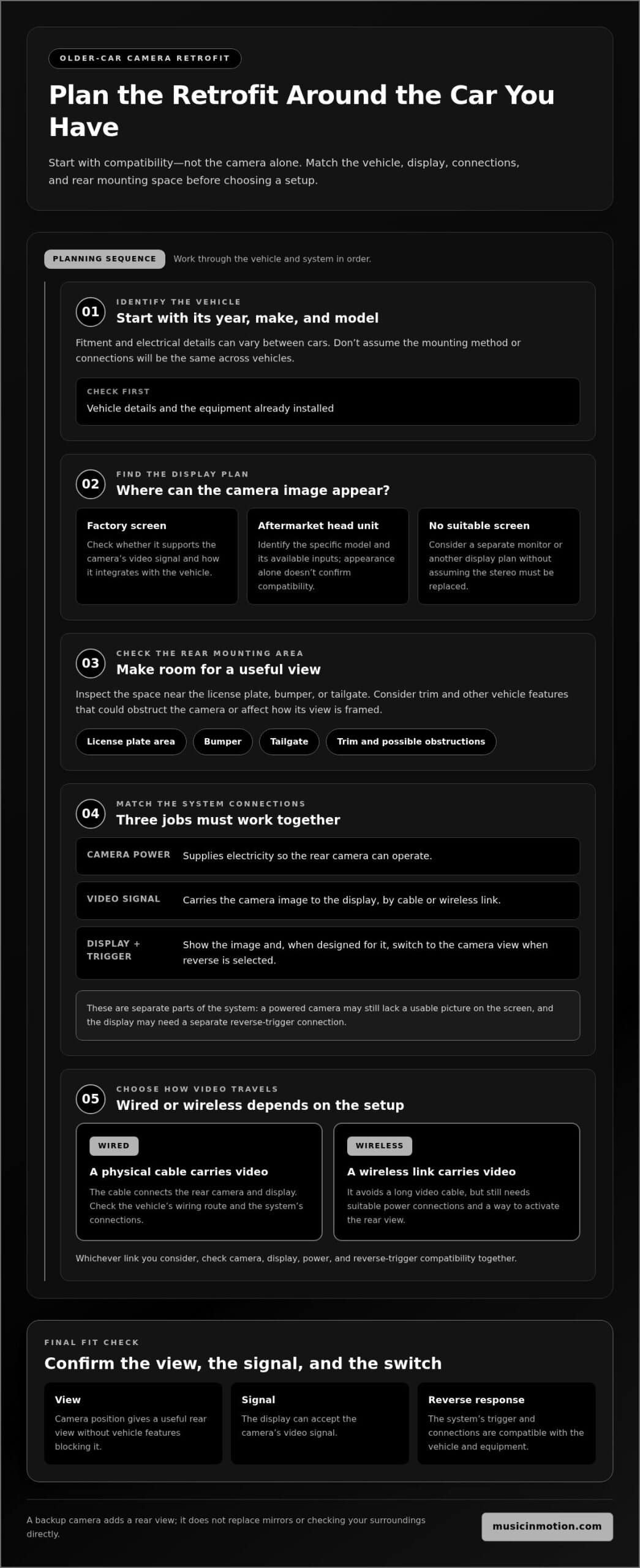
What should you check on an older car before choosing?
First, identify the equipment already in the car. A factory screen, an aftermarket head unit, and a vehicle with no suitable display each raise different questions about where the camera image can appear. A screen may need a compatible video input or another integration approach. The head unit’s age or appearance won’t tell you which connections it supports, so identify the specific equipment before choosing a system.
Next, look at the rear of the vehicle. The space around the license plate, bumper, or tailgate can affect where the camera can sit and how its view is framed. Check whether trim or other vehicle features could obstruct the proposed mounting point. The camera should provide a useful rear view without being placed where the vehicle’s design blocks it.
Use this quick checklist before choosing a setup:
- Vehicle: Note the year, make, and model. Fitment and electrical details can vary, so don’t assume the connection or mounting method will be the same across cars.
- Display: Identify whether you have a factory screen, an aftermarket head unit, or no suitable display. Consider where the camera image could appear in the cabin.
- Mounting: Check the available space near the rear plate, bumper, or tailgate, and consider how the camera’s position could affect visibility.
Finally, consider how the system will respond when you select reverse. In many setups, selecting reverse prompts the display to switch to the camera view, but camera power, the video signal, and the trigger are separate parts of the system. Their connections depend on the vehicle and equipment. If the existing screen, wiring, or mounting space makes the right match unclear, a custom installation can integrate a camera safety system with the car’s existing technology.
How an Older-Car Backup Camera Connects to the Display
A camera retrofit has three jobs to coordinate: the camera needs power, its video signal must reach a screen, and the display must show that image at the right time. These functions are related, but they aren’t the same connection. A camera can power on without sending a usable picture to the display, and a video signal may need a separate reverse trigger to make the screen switch views when you select reverse.
In a wired setup, a cable carries the video signal between the rear camera and the display. A wireless setup sends that signal without a long video cable, but still needs suitable power connections and a way to activate the rear view. The exact arrangement varies by system and vehicle. Check camera, display, power, and reverse-trigger compatibility together rather than focusing on the camera alone.
- Camera power: Supplies electricity so the rear camera can operate.
- Video transmission: Carries the camera image to the display, by cable or wireless link depending on the setup.
- Display and trigger: Show the image and, where the system is designed for it, respond when the vehicle is placed in reverse.
Using an existing factory or aftermarket screen
If your car has a screen, using it may preserve the familiar dashboard layout and put the camera view somewhere you already look. But a screen’s presence doesn’t guarantee it can accept the camera’s video signal. Factory screens differ in their available inputs and behavior, and aftermarket head units also vary by model and installation. Consider the display’s capabilities alongside the vehicle’s integration needs.
For example, a head unit may have a suitable video input but still require a vehicle-specific approach to power or reverse-trigger integration. In another car, the factory screen may not support an added camera, making a separate monitor or another display plan more practical. Identify the specific screen and equipment before choosing a camera system instead of relying on its appearance or assumptions about the dashboard.
Adding a separate monitor when the car has no suitable screen
A dedicated monitor can provide a display without replacing the stereo. Its placement should make the image easy to see while keeping the dashboard usable and the driver’s view clear. The best position depends on the interior, sightlines, and available mounting space. A monitor that works in one vehicle may obstruct controls or feel awkward in another, so include placement in your fitment plans.
Replacing the head unit is another option. It may bring the camera display into the central dashboard, but it changes more of the car’s existing electronics and requires vehicle-specific integration. A separate monitor keeps the stereo in place, while a head-unit replacement makes the screen part of the dashboard system. Neither is right for every car. The choice depends on your priorities, the equipment already installed, and how cleanly the setup can work with the vehicle.
When display integration or wiring feels complex, a tailored backup camera installation can bring the camera, screen, and existing vehicle technology together as a complete retrofit.
Wired vs. Wireless Backup Cameras: Which Retrofit Fits Your Car?
Choosing between wired and wireless is less about finding a universally better system and more about how each one fits your car. A wired camera sends video through a physical cable routed between the rear of the vehicle and the display. A wireless system transmits the video signal without that long cable, but still needs suitable power connections and secure camera and display placement.
| Consideration | Wired system | Wireless system |
|---|---|---|
| Video connection | Physical cable runs between camera and display. | Video travels wirelessly between system components. |
| Installation work | Requires planning and routing the cable through the vehicle. | Reduces the need for a long video cable, but still involves power and mounting. |
| Vehicle fit | Depends on a practical cable route and access behind trim. | Depends on suitable power locations and compatible system components. |
These are general differences, not a guarantee that one type will suit every older car. The vehicle’s layout, existing display, available wiring routes, and your installation priorities all matter. When deciding how to add a backup camera to an older car, compare the complete path from camera to screen, not just the connection label on a kit.
When a wired camera may make sense
A wired setup may suit a retrofit if there’s a workable route for a physical video cable and you prefer a direct connection between camera and display. The main task is routing the cable cleanly from the rear of the vehicle into the cabin. Accessing the route may involve removing interior trim, and the vehicle’s construction can affect how much access is needed.
Think beyond the distance between the camera and screen. The cable must pass through the vehicle without interfering with trim or other components, and it needs to reach the display while staying out of the way. The exact route depends on the car, so installation effort can vary even between vehicles with similar layouts.
When a wireless camera may suit the installation
A wireless system can reduce the need to run a long video cable through the vehicle, which may be useful if that route is difficult to access. But “wireless” describes how video is transmitted, not how every part of the system is powered. The camera and display components still need appropriate power connections, and both ends need mounting locations that work for the vehicle.
Before deciding, check what the specific system requires at the camera and display. A shorter cable route doesn’t remove the need to plan electrical connections, position the camera, and integrate the display. Wireless may simplify one part of the installation, while wired may suit another vehicle better. The car’s layout matters more than the label.
As you compare options, consider which installation task is more manageable in your car: routing video cable through the cabin or providing suitable power and placement for a wireless setup. If trim access, wiring, or display integration is complex, custom vehicle-electronics installation can tailor the camera system to the vehicle rather than forcing a one-size-fits-all approach.
How to Plan a Backup Camera Installation on an Older Car
A good retrofit starts with a plan, not with removing trim. Before deciding how to add a backup camera to an older car, map out the vehicle’s mounting options, display setup, and installation needs. This helps you decide whether the project suits DIY or whether vehicle-specific fitment and wiring make custom integration a better fit.
- Inspect the vehicle. Note the year, make, and model, check the rear area for practical camera mounting space, and identify any existing screen or head unit. Look for details that could affect access, such as rear trim or a complicated dashboard layout.
- Choose a compatible setup. Match the camera and connection type to the vehicle’s layout and electrical requirements. Don’t assume a kit will work with every older car just because it appears to have the right parts.
- Plan the display. Decide whether the existing screen can be integrated or whether a separate monitor or head-unit change makes more sense. Consider visibility and how the image will fit into the cabin.
- Plan the installation. Think through mounting, cable routing where needed, component placement, and electrical connections before work begins. Follow the instructions for both the camera system and the specific vehicle.
Camera installation may involve trim removal, routing connections through the car, and integrating with vehicle-specific electrical systems. Work carefully: trim can be difficult to access, and wiring details vary between vehicles. Avoid guessing at connections or forcing components into place. A broader overview of related upgrades is available in our vehicle safety systems guide.
What a DIY installation involves
At a high level, a DIY project includes preparing a suitable mounting point, routing the system’s connections, securing the camera and display components, and testing operation. The exact work depends on the car and equipment, so follow the relevant installation instructions rather than relying on a generic wiring sequence. Pause if you encounter unfamiliar wiring, difficult trim access, or uncertainty about compatibility between the display and camera. Protecting the vehicle’s existing components matters more than pushing through a confusing step.
When professional integration can simplify the project
Professional custom installation can be a practical choice when the camera’s fit, display integration, or wiring route is unclear. Music In Motion installs camera safety systems and works with vehicle electronics, tailoring installations to integrate modern equipment with existing vehicle technology where appropriate. Custom fabrication can also address vehicle-specific placement needs. The goal is a considered, functional retrofit, not a one-size-fits-all arrangement.
If the project involves several unknowns, or you’d rather leave trim access and electrical integration to experienced installers, explore custom installation solutions for a backup camera setup tailored around your vehicle.
Get an Older-Car Backup Camera Integrated Around Your Vehicle
A successful retrofit isn’t just a camera added to the rear of the car. The camera, display, mounting position, and vehicle connections need to work together as one system. That’s the key to how to add a backup camera to an older car without treating every vehicle as if it has the same layout or equipment.
Music In Motion provides custom installations for backup cameras and camera safety systems, with a focus on integrating modern electronics with existing vehicle technology where appropriate. The goal is a finished upgrade planned around your car, not a one-size-fits-all arrangement.
What a tailored camera safety installation should address
A tailored installation considers the view from the rear mounting position alongside the display you’ll use in the cabin. Camera placement affects what appears on screen, while the vehicle’s interior and existing equipment shape how the image can be presented. Consider these choices together before installation begins.
Cable routing, component placement, and the finished appearance also matter. A well-planned solution accounts for the car’s construction and fits the equipment into its existing layout as thoughtfully as possible. There isn’t one mounting position or connection approach that suits every older vehicle. The right plan depends on its body, interior, and electronics.
Take the next step toward a more confident reverse
Before planning an installation, gather a few details about your vehicle and preferences. They help clarify the retrofit and the decisions that matter most:
- Vehicle: Note its year, make, and model, along with any rear-area features that could affect camera placement.
- Display: Identify whether you have a factory screen, an aftermarket head unit, or no suitable display.
- Connection preference: Consider whether you’re leaning toward a wired setup or wireless video transmission, while keeping in mind that either option must suit the vehicle and installation.
Those details provide a practical starting point, not a reason to replace a dependable older car. If the display, wiring, or mounting options seem complicated, custom integration can bring the pieces together while respecting the technology already in the vehicle. Music In Motion pairs vehicle-electronics expertise with a straightforward, customer-focused experience, keeping the conversation centered on the result you want.
Explore Music In Motion’s custom installation solutions to discuss a backup camera installation tailored to your vehicle and its existing setup. A well-planned retrofit can add a useful rear view while letting you continue enjoying the car you know.
Turn Your Retrofit Plan Into a Confident Next Step
Your older car can keep serving you while its technology gets a thoughtful update. The next move is to turn what you’ve learned about how to add a backup camera to an older car into a plan that suits the way you use your vehicle. Consider what would make the system feel natural in your daily routine, from where you see the image to how neatly the new equipment fits into the cabin.
You don’t need to have every technical choice settled before moving forward. A conversation about your vehicle and priorities can help shape a practical direction, whether you’re weighing display options or want support with installation. Music In Motion provides custom installation solutions with attention to the details that help an upgrade fit your car.
Explore Music In Motion’s custom installation solutions and take the next step toward a retrofit planned around your vehicle. A well-matched camera adds a view behind the car while letting you continue enjoying the one you know.
Frequently Asked Questions
Can you add a backup camera to a car that has no screen?
Yes, a car without a suitable screen can still use a backup camera if you add a compatible display as part of the setup. A separate monitor is one option; replacing the head unit with a display-equipped unit is another. The right choice depends on the dashboard layout, available mounting space, and how you want to use the stereo. Consider visibility and access to controls before settling on a screen location.
Can an aftermarket backup camera work with a factory radio?
Sometimes, but a factory radio without a display can’t show the camera image by itself. If the vehicle has a factory screen, whether it can display an aftermarket camera depends on that screen’s inputs and how the vehicle’s electronics handle the connection. A separate monitor may be an alternative if the factory system isn’t suitable. Identify the specific radio and screen equipment before choosing a camera system.
Do wireless backup cameras still need to be wired for power?
Yes. Wireless describes how the camera video signal travels to the display; it doesn’t mean the camera operates without power. The camera and display components need power connections suited to the particular system, and the display may also need a signal to show the image while reversing. Check the kit’s instructions to understand which parts need power and how the system is intended to activate.
Is it difficult to install a backup camera on an older car?
It depends on the vehicle and the system. A straightforward mounting location and accessible route may make some installations more manageable, while tight trim, unfamiliar electrical connections, or difficult display integration can add complexity. If you’re planning how to add a backup camera to an older car, pause rather than guess when a connection or removal step is unclear. A custom installer can handle vehicle-specific fitment and integration.
Can a backup camera be mounted without replacing the rear license plate?
Yes, a camera doesn’t always need to replace or attach to the license plate. Depending on the vehicle and camera design, another suitable mounting point may be near the bumper or elsewhere at the rear. The location needs to provide a useful view and allow the camera to be secured appropriately. Check the car’s available space and the camera’s mounting requirements before choosing a position.
Will an aftermarket backup camera turn on automatically when reversing?
It can, if the system and vehicle are set up so selecting reverse triggers the display to show the camera image. That behavior depends on the camera system, the display, and how the vehicle’s electrical connections are integrated. Some setups may require a different activation method. Review the system’s instructions and plan how it will switch views before installation, especially if you’re using an existing factory screen.
Does adding a backup camera mean I can stop checking my mirrors?
No. A backup camera is an additional view, not a replacement for mirrors or direct checks of your surroundings. Use it as one part of a careful reversing routine: check around the vehicle, use your mirrors, and glance at the camera image as you maneuver. A camera’s view is limited to what its position captures, so don’t rely on the screen alone when backing out of a space or driveway.