A stronger Civic system isn’t just about adding bass. A Honda Civic sound system build can bring together a 12-inch subwoofer in a sealed enclosure, upgraded speakers, and a Double-DIN dash kit fitted to the vehicle. The right combination keeps the sound cohesive while making the new components work with the cabin.
It’s natural to focus on the subwoofer first, but the head unit, speakers, enclosure, and dash fitment all shape the finished result. Each part plays a role, and your Civic’s year and trim help determine which components and installation approach are suitable.
This guide explains what a Honda Civic sound system build can include, how a sealed enclosure contributes, and what to consider when choosing speakers and Double-DIN fitment. It also covers how custom installation brings the components together, so you can plan a complete upgrade rather than a collection of parts.
Key Takeaways
- A sealed enclosure and 12-inch subwoofer can anchor the build; consider how bass will balance with the rest of the system.
- Match the dash kit to your Civic’s year and trim. The Metra 95-7882B is specified for 2013-2015 models and doesn’t retain the Honda i-MID display.
- Compare speaker power handling and frequency response when choosing replacements, then check how they’ll work with the head unit and amplifier.
- Plan the subwoofer and amplifier as a pair, with the sub’s power rating guiding the match and installation choices shaping the finished setup.
12-Inch subwoofer and sealed enclosure
A basic Civic build might focus on a subwoofer and enclosure, while a more involved system can add speaker and amplifier upgrades. A comprehensive setup coordinates the head unit, speakers, amplification, enclosure, and sound treatment as one system. Choose components for compatibility and performance, not price alone.
A 12-inch driver gives the enclosure a clear starting point, but the subwoofer’s ratings matter too. The Kicker 43C124 has a 12-inch driver, handles 150 watts RMS, and lists a frequency response of 27-500 Hz. Those figures help match the subwoofer to an amplifier and plan its role alongside the Civic’s speakers.
A sealed enclosure holds an enclosed air space behind the subwoofer. Its internal volume and construction affect performance, so match the design to the subwoofer’s specifications. In a Civic, consider how the enclosure will fit the cargo area without getting in the way of everyday use. Secure it in place and route wiring away from moving or pinched areas.
Start by identifying your Civic’s speaker locations and head-unit connections. Fit compatible speakers and adapters, mount the amplifier securely, and connect its power and signal wiring. Install the subwoofer in its enclosure, then test the system at moderate volume before finishing the installation.
A Civic build may require vehicle-specific wiring adapters, speaker connectors, amplifier power and signal wiring, and mounting hardware. Sound-deadening material can help reduce panel vibration. Apply it where panels resonate, while keeping access points and wiring clear.
An amplifier can place extra demand on the electrical system if its power draw exceeds what the vehicle can support. Poor connections or incorrect wiring can also cause heat, blown fuses, or system faults. Match the amplifier and wiring to the vehicle and have connections installed correctly.
Noise rules vary by jurisdiction, so follow the local requirements that apply to subwoofer use. Music In Motion’s car audio upgrades and custom installations can help address Civic fitment, wiring, and enclosure installation as part of a coordinated system.
What sound system upgrades fit my Honda Civic year and trim?
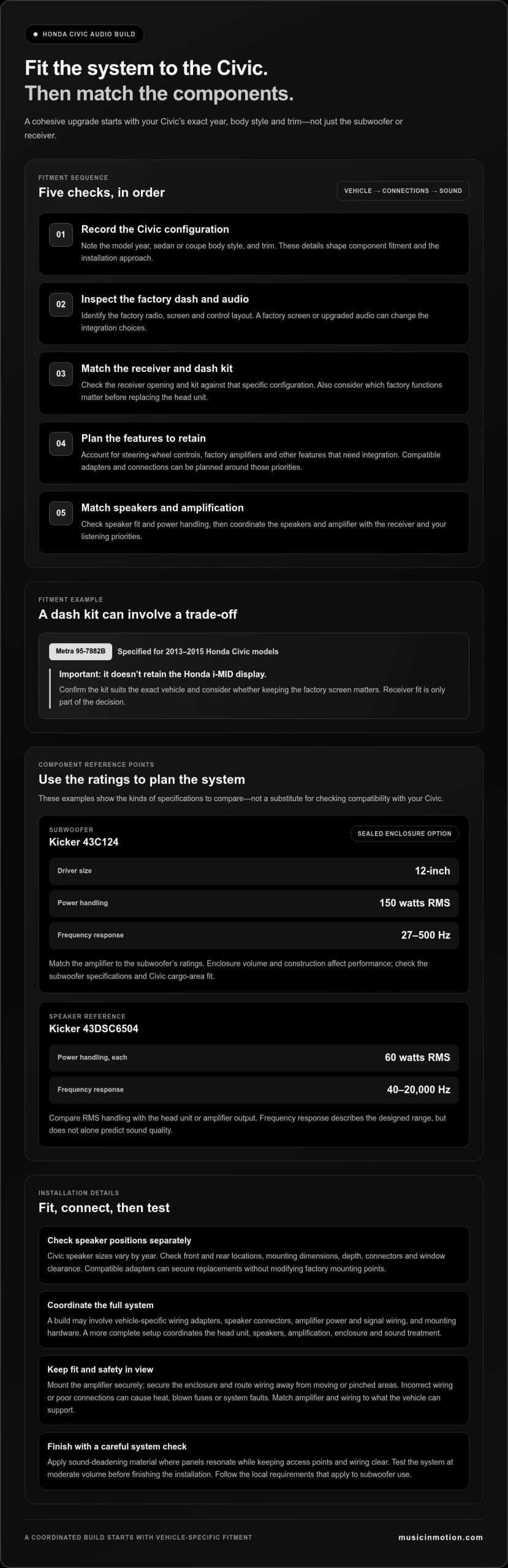
Start with your Civic’s model year, body style, and trim, then identify the factory radio and dash layout. These details affect whether a Double-DIN receiver fits, which dash kit is needed, and how factory features connect. A kit designed for one Civic generation may not suit another, so match components to the exact vehicle.
For example, the Metra 95-7882B dash kit is specified for 2013-2015 Honda Civic models. It doesn’t retain the Honda i-MID display, an important trade-off for drivers who rely on that factory screen. This example shows why fitment means more than checking whether a receiver fits the opening. Consider which original functions matter before choosing a replacement head unit and kit.
Use this fitment sequence:
- Record the Civic’s model year, sedan or coupe body style, and trim.
- Inspect the dashboard and note the factory screen and control layout.
- Match the receiver opening and dash kit to that specific configuration.
- Identify steering-wheel controls, factory amplifiers, and other features that need integration.
- Choose speakers and amplification to complement the receiver and your listening priorities.
Trim can change the starting point. A Civic with a factory screen or upgraded audio may need different integration choices from a model with a basic radio. Before selecting a Double-DIN receiver, list the features you want to retain, such as steering-wheel controls. This helps the installer plan compatible adapters and connections around your priorities.
Fitment also affects the finished appearance. A suitable dash kit helps the new receiver sit cleanly in the center stack, while correct wiring adapters reduce the need to alter factory wiring. For a year-specific system plan, explore Civic audio fitment options as part of your upgrade research. Matching the dash, connections, and audio components from the outset helps create a cohesive setup.
What are the best car speakers for a Honda Civic, and what sizes fit?
The right speakers depend on your Civic’s year, trim, factory audio, and listening priorities. Direct replacements can simplify installation, while a component system separates tweeters from midrange drivers. First identify each factory speaker location, then compare the replacement’s mounting dimensions and depth. Door shape, mounting points, and window clearance all affect fit.
The Kicker 43DSC6504 offers a concrete performance reference. Each speaker is rated for 60 watts RMS, with a frequency response of 40-20,000 Hz. RMS power helps compare continuous handling with an amplifier’s output. Frequency response describes the range the speaker is designed to reproduce, but does not alone predict sound quality.
Speaker size varies by vehicle, so don’t assume every Civic year uses the same drivers. Check front and rear positions separately, then compare the speaker frame, mounting depth, and connector. A compatible adapter can secure a replacement without modifying the factory mounting point. Leave room for the door glass and window hardware to move freely.
- Record the Civic’s model year, trim, and body style.
- Identify each speaker location and measure its opening and available depth.
- Compare the speaker’s RMS rating with the head unit or amplifier output.
- Choose coaxial speakers for a combined driver and tweeter, or components for separate placement.
For example, a Kicker 43DSC6504 pair may suit a system seeking balanced full-range playback. It won’t replace a subwoofer’s role in low bass. Consider speaker sensitivity and amplifier compatibility alongside RMS handling, rather than choosing by brand or response range alone. Matching front and rear output also helps keep vocals centered and music consistent.
Before ordering, confirm that the speaker fits your Civic’s exact location and trim configuration. Use the correct mounting adapters and connectors, then test each channel before reinstalling the door panels. This can reveal polarity or connection problems early. A well-matched speaker upgrade should complement the rest of the system.
Its stated frequency response is 40 – 20k, a specification that can help compare its published range with other candidates. Treat that figure as one selection detail, alongside fit, system matching, and listening priorities.
Which subwoofer and amplifier work well in a Honda Civic?
Choose the amplifier around the subwoofer, not the other way around. Compare the subwoofer’s RMS power handling with the amplifier’s continuous output at the correct impedance. Avoid judging a match by peak power alone. For the Kicker 43C124 discussed earlier, use its specifications to guide amplifier selection, then make sure the amplifier supports the subwoofer’s wiring configuration.
Next, consider how the enclosure affects the system. Sealed and vented enclosures involve different design choices, so follow the subwoofer manufacturer’s guidance. Correct internal volume helps the driver perform as intended. A custom enclosure can also use the Civic’s cargo space effectively and provide a secure fit.
Use this matching sequence:
- Identify the subwoofer’s RMS rating and impedance requirements.
- Compare those requirements with the amplifier’s continuous output specifications.
- Confirm that the amplifier supports the planned subwoofer wiring arrangement.
- Choose an enclosure design and internal volume suited to the driver.
- Plan amplifier placement, wiring routes, and cargo access in the Civic.
During setup, treat the amplifier’s gain as a signal-matching control, not a volume control. Set it to suit the incoming audio signal, then listen for distortion at normal listening levels. Excessive gain can make the system sound harsh and put unnecessary stress on the subwoofer. Balance the bass with the Civic’s door speakers so vocals and instruments remain clear.
Finally, secure the enclosure and amplifier, protect wiring from sharp edges, and test the system before finishing the installation. A custom enclosure is useful when a standard box doesn’t suit the available space or the desired layout. For a matched enclosure and installation plan, get help planning your Civic subwoofer setup.
Music In Motion: Car Audio Upgrades
Music In Motion can turn your Civic audio plan into a coordinated system. Its car audio upgrades and custom installations address component choices and vehicle fitment, from speaker replacement to receiver and subwoofer integration. If your plan includes a tailored enclosure, custom subwoofer enclosures can bring the bass component into the overall design. Discuss your priorities, such as clearer vocals, stronger bass, or a Double-DIN receiver, alongside factory features, available space, and installation needs. Contact Music In Motion to discuss your Honda Civic sound system build.
Shape the sound around your drive
Before settling on a system, think about how you want your Civic to sound during everyday drives. Are you after more detail at low volume or a more immersive listening experience? Your preference can guide system balance, tuning, and how the setup fits your routine. A thoughtful Honda Civic sound system build starts with your listening priorities, not a parts list.
Music In Motion provides Car Audio Upgrades and Custom Installations for drivers planning a coordinated system. The company also installs Marine Audio Systems, applying its audio expertise across different vehicles. To plan your Civic build, discuss what you want to hear and how you use the car, then shape the system around those goals.
Ready to talk through your ideas? Contact Music In Motion and take the next step toward a Civic system that feels right for your drive.
Frequently Asked Questions
What’s Included?
A Honda Civic sound system build can include a receiver, upgraded speakers, an amplifier, a subwoofer, an enclosure, wiring, and installation, depending on your goals. Not every setup needs every component. You could start with front speakers and choose equipment that can support a future amplifier. A complete plan also accounts for factory features and checks that each component works properly once installed.
How can I keep steering-wheel controls, backup camera, and factory safety features after an audio upgrade?
List the factory features you want to keep and plan compatible adapters and connections for your Civic. Steering-wheel controls are one integration consideration to address during the installation plan.