What if the fix for weak car bass isn’t turning the bass slider up? If your music sounds boomy on one track, thin on another, or muddy as soon as you add bass, the equalizer may not be the only factor. Optimizing equalizer settings for car audio bass starts with small, controlled adjustments, not pushing every low-frequency band to the limit.
EQ labels and sliders can feel technical, but you can make changes methodically and listen for what improves. This guide walks you through adjusting bass-related EQ bands, avoiding distortion, and keeping vocals clear while finding a sound that suits your music.
You’ll also learn how EQ differs from gain, crossovers, and subwoofer controls, and how to recognize when weak or uneven bass may point to a system setup issue. For factory and upgraded systems alike, the goal is a balanced listening experience. When EQ can’t get you there, careful system integration or a custom subwoofer enclosure may be the next step.
Key Takeaways
- Start from a documented or neutral EQ setting and keep listening volume steady so comparisons are meaningful.
- For optimizing equalizer settings for car audio bass, change one band at a time in small steps, then keep or undo each adjustment based on what you hear.
- Use cuts as well as boosts: reducing an overly strong frequency can help restore balance without adding more bass.
- Match the next step to the symptom. Weak, boomy, distorted, and uneven bass can each point to a different adjustment or system issue.
- If EQ changes don’t resolve the problem, equipment integration, a properly integrated subwoofer, or a custom enclosure may need attention.
What Car Audio EQ Can, and Cannot, Do for Bass
An equalizer (EQ) adjusts the level of selected frequency ranges in an audio signal. Raising a low-frequency band can make bass seem fuller, while lowering a band can reduce a boomy note and bring the rest of the music into better balance. These audio equalization principles explain what EQ changes, but they don’t mean every bass problem can be fixed with a slider.
EQ cannot restore frequencies a system cannot reproduce. It shapes the sound your speakers and subwoofer can produce; it doesn’t expand their physical limits or correct an installation issue. EQ also differs from other controls: the volume sets the overall listening level, amplifier gain matches the signal entering an amp, subwoofer level changes the sub’s output relative to other speakers, and a crossover directs frequency ranges to the appropriate speakers. Adjusting one control isn’t a substitute for setting up the others correctly.
Which EQ bands affect perceived bass?
Sub-bass refers roughly to the deepest low frequencies, which are often felt as rumble. Mid-bass covers more of the punch and weight in drums and bass guitar. These boundaries are approximate, not universal. A head unit may offer a few fixed graphic EQ bands, while an audio processor may allow finer adjustments. Band labels and frequencies vary by system.
A small boost in a low band may add fullness, but a broad or heavy boost can make vocals sound muddy or push speakers and amplifiers into strain. The aim of optimizing equalizer settings for car audio bass is controlled balance, not maximum slider height.
When will an equalizer not solve weak bass?
Weak or uneven bass can involve speaker limits, speaker placement, enclosure behavior, or the way the system is set up. Rattles, sound dropouts, or bass that seems concentrated on one note can also point to something beyond EQ. These symptoms aren’t proof of a particular fault, so avoid guessing based on sound alone.
Change one variable at a time. Compare EQ settings at a consistent listening level, then return to neutral if a boost makes the sound harsher without adding useful impact. If the problem persists, check equipment matching or system integration rather than adding more bass.
Before Changing Bass EQ, Set a Reliable Listening Baseline
Good comparisons depend on consistency. If the volume, track, or playback settings change between tests, it’s hard to tell whether an EQ adjustment improved the bass or simply made the music louder. Before optimizing equalizer settings for car audio bass, create a reliable starting point you can return to.
Prepare the source, playback, and listening position
Choose a few familiar recordings with clear low notes and vocals, as well as different kinds of bass, such as a steady bass line and a kick drum. Use the same playback source for each comparison, whether that’s a streaming app, a connected device, or another source. A heavily compressed or unfamiliar track can make small differences harder to judge.
Check the source app for its own EQ, loudness setting, or bass enhancement. Turn extra processing off if you can, or leave it unchanged throughout the test. Keep your seat position, balance, and fader settings the same too. This helps isolate what the car’s EQ is doing instead of mixing several changes together.
Record the starting settings before experimenting
Take a photo or write down the current EQ levels before moving any sliders. If the head unit offers a neutral preset, use it as a starting point; otherwise, preserve the existing setup so you can restore it. Note the head-unit EQ and subwoofer level separately. They affect the overall blend in different ways, so changing both together makes the result difficult to judge.
Keep listening volume steady and comfortable. Maximum volume isn’t a useful test: it can make distortion harder to separate from an EQ change and may put unnecessary strain on the system. Don’t adjust crossover, amplifier gain, subwoofer level, and EQ all at once. Make one change, listen to the same part of a track, and record what you notice before moving on.
Baseline checklist: neutral or documented EQ, fixed listening volume, familiar tracks, unchanged listening position, and one adjustment at a time.
Describe what you hear, not just the slider position: “bass line clearer,” “kick drum too heavy,” or “vocals less distinct.” These notes give you a practical reference for comparing settings later. If you find the controls hard to separate, a professionally integrated car audio upgrade can bring EQ, subwoofer level, and the rest of the system together for a balanced listening experience.
How to Optimize Equalizer Settings for Car Audio Bass
With your starting settings recorded, make each adjustment easy to evaluate. The aim isn’t to push every low-frequency slider upward. It’s to find a bass balance that adds weight without masking vocals, flattening musical detail, or making the system sound strained.
- Start from your baseline. Keep your usual listening position and volume, and select a familiar track with clear bass and vocals.
- Choose one low-frequency band. Begin with the lowest relevant band on your EQ. Make a small change, then pause before adjusting anything else.
- Listen for the result. Does the bass have more depth or rumble? Is it still defined, or does it sound loose, muddy, or strained? Notice any new rattling and whether vocals remain clear.
- Compare with your baseline. Return to the original setting at the same volume. If the change improves the sound, keep it temporarily; if not, undo it.
- Move to another band only if needed. Work gradually toward mid-bass bands, repeating the same listen-and-compare process. Record each change so you can retrace your steps.
Adjust low-frequency bands without muddying the mix
Start low and listen for added depth, not simply more loudness. Then assess the mid-bass, which can add punch to drums and weight to bass notes. Too much emphasis here may blur vocals or instruments. If the sound becomes bloated, undo the last adjustment before testing another band. Small changes make it easier to hear which range helps and which one takes the mix out of balance.
Compare settings across familiar music
Check your preferred adjustment against at least two or three familiar tracks with different bass characteristics. A setting that suits a deep electronic bass line may not work as well with a recording built around drums or acoustic instruments. Compare each track with your baseline at the same volume, listening for fullness, definition, vocal clarity, and unwanted rattles. Save a preferred setting only if it holds up across the tracks you enjoy.
Keep the smallest adjustment that improves the sound across several familiar tracks. This helps prevent over-boosting and keeps your EQ useful beyond a single song. Optimizing equalizer settings for car audio bass is a repeatable process: adjust one band, listen carefully, compare, then retain or undo the change.
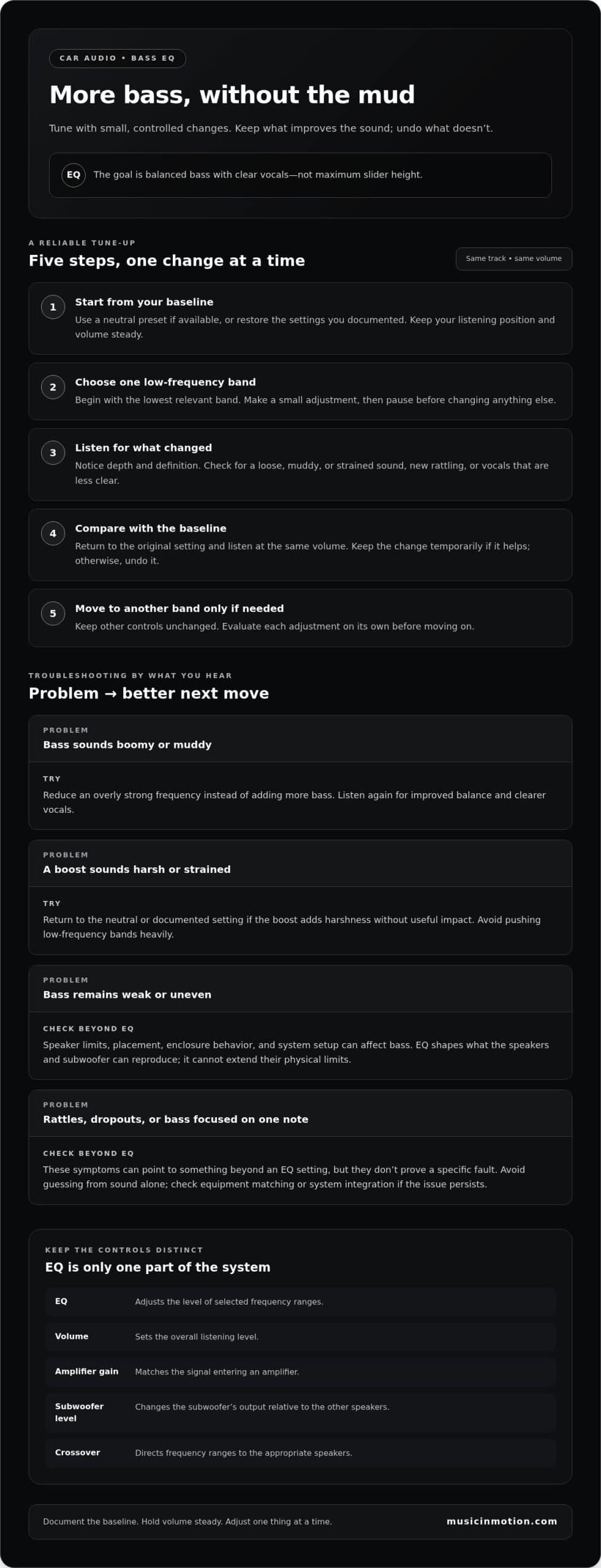
Bass EQ Troubleshooting: Boost, Cut, or Check the System?
More bass isn’t always better bass. Raising every low-frequency slider can exaggerate certain notes, muddy vocals, or push speakers beyond comfortable operation. A controlled cut can help just as much as a boost: lowering a frequency that sounds excessive may make the overall bass feel clearer and more balanced.
Use the symptom as a starting point, not a definitive diagnosis. Change one setting at a time and compare at a moderate, consistent listening level.
| What you hear | What to try next |
|---|---|
| Weak bass | Check playback, balance, and fade settings. Try a small adjustment to one relevant low-frequency band, then compare with your baseline. |
| Boomy or muddy bass | Undo the most recent boost. If one note still dominates, try a modest cut in the band that seems excessive. |
| Distorted bass | Lower the listening level and return EQ boosts toward neutral. Persistent distortion needs system assessment, not more boost. |
| Uneven bass | Compare familiar tracks and listening positions. If the problem persists across settings, consider broader system setup or integration. |
What to try when bass sounds boomy or muddy
Undo the latest boost and listen again for clearer vocals and better separation between instruments. Also check for overlapping bass enhancement from the head unit, source app, or subwoofer controls. If the muddiness remains across different EQ settings, treat it as a clue rather than a complete diagnosis. More than one control or part of the system may be involved.
What to do when bass is weak or distorted
First, distinguish low output from distortion. Compare at a moderate, consistent volume, then check for changes in source quality, balance, fade, or playback settings. If distortion or rattling continues after returning EQ toward neutral, stop increasing the bass. The issue may need a broader assessment of the system rather than another slider adjustment.
Optimizing equalizer settings for car audio bass means responding to what you hear, not boosting every low band by default. If careful adjustments don’t resolve weak, uneven, or distorted bass, professional integration can address the system as a whole. Explore professional car audio upgrades for a more complete listening solution.
When Better Bass Needs Professional Car Audio Integration
If bass remains weak, uneven, or distorted after careful EQ adjustments, the limitation may sit elsewhere in the system. Speakers have physical limits, placement affects what you hear, and subwoofer performance depends on how the equipment works together. EQ can shape the sound, but it can’t reliably overcome every equipment or enclosure limitation.
Signs the issue may go beyond equalizer settings
Look for a problem that repeats across familiar tracks and settings. Distortion that returns when bass notes hit, persistent rattles, bass that varies noticeably between songs, or limited output despite modest EQ changes are reasons to look beyond the sliders. These symptoms don’t identify a specific fault on their own, but they are useful clues when assessing the system as a whole.
Keep your baseline notes, including the settings you changed and what you heard. Describing when the issue happens, such as rattling on certain notes or bass fading at a consistent listening level, gives a clearer starting point for a system assessment. If the factory stereo limits your adjustment options, explore car audio upgrade options for a stock stereo.
How professional tuning supports a balanced result
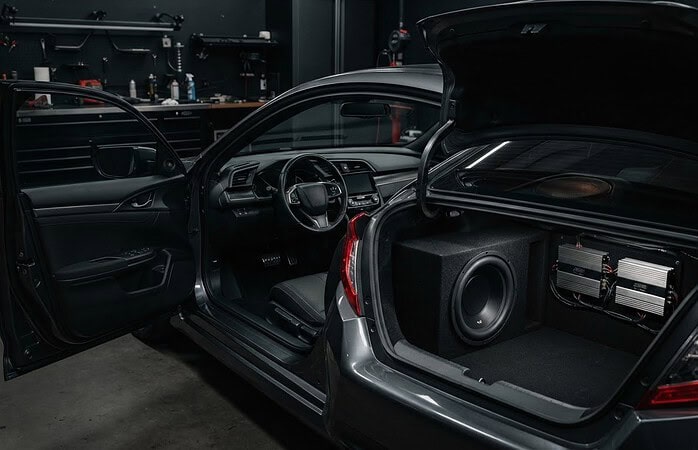
Professional integration considers how the audio components work together instead of treating bass sliders in isolation. It can include equipment matching, installation, subwoofer integration, and the effect of the enclosure on the bass you hear. A properly integrated subwoofer and enclosure are parts of the full system, not a guaranteed fix for every listening concern. If bass behavior seems tied to the enclosure, learn more about custom subwoofer enclosure fabrication.
Careful EQ adjustment is a useful tool, but optimizing equalizer settings for car audio bass has limits when the underlying setup isn’t working well together. Music In Motion provides car audio upgrades and custom installations, including system integration and custom enclosure work tailored to the project.
Talk with Music In Motion about your car audio goals and the sound you want from your system.
Build Bass That Feels Balanced on Every Drive
Better bass doesn’t come from pushing every EQ slider higher. Start with a consistent listening baseline, make small changes one band at a time, and compare familiar tracks at the same volume. The best setting adds depth while keeping vocals clear and avoiding rattles or distortion.
Remember that optimizing equalizer settings for car audio bass can only shape what your system is capable of producing. If weak, uneven, or distorted bass persists, the issue may involve system integration, equipment matching, or the subwoofer enclosure. A balanced result depends on how the whole setup works together.
Music In Motion provides professional car audio upgrades, custom installations, and custom subwoofer enclosure fabrication. Locally owned and operated by Mike and Kim, the business was founded in 1994. Talk with Music In Motion about building better bass into your car audio system and take the next step toward a sound that makes every drive more enjoyable.
Frequently Asked Questions
Can equalizer settings damage car speakers?
EQ itself is an adjustment and doesn’t automatically damage speakers, but aggressive boosts can demand more output and contribute to distortion or system strain. Keep volume moderate and make small changes, listening after each one. If you hear crackling, harshness, or other distortion, undo the setting that caused it and lower the level. There’s no universal safe slider limit because speaker capability and system configuration vary.
What EQ setting gives the most bass in a car?
There’s no universal EQ setting that gives the most bass in every car. Vehicles, speakers, subwoofers, audio sources, and personal preferences all affect the result. Start with a neutral setting, then gradually adjust relevant low-frequency bands while checking familiar tracks. Listen for clear, full bass, not just extra volume. If vocals become muddy or distortion appears, reduce the boost. Stronger bass isn’t always better bass.
Should I boost or lower bass on my car equalizer?
Choose based on what you hear. A small boost may help if bass lacks presence, while a cut can improve balance if a frequency sounds boomy or overpowering. Adjust one band at a time and compare the change with your baseline at the same volume. If vocals lose clarity or the bass becomes less defined, undo the adjustment. The goal is a balanced mix, not the highest bass setting.
Why does my car bass sound weak even with the EQ turned up?
EQ can’t overcome every limitation in speakers, subwoofer integration, enclosure behavior, playback settings, or installation. Check whether the source app or head unit is applying overlapping processing, then compare familiar tracks at a moderate volume. If output remains weak, continuing to raise bass bands may add strain without solving the underlying issue. Optimizing equalizer settings for car audio bass starts with controlled adjustments, but persistent weakness calls for a system assessment.
Should I use a bass boost setting or adjust the equalizer?
Bass boost usually adds a broad low-frequency enhancement, while an equalizer can offer more targeted control, depending on the equipment. Using both at once may make bass boomy or distorted, so begin with extra enhancements disabled or neutral. Then make one controlled change and listen before adjusting anything else. If the sound loses clarity, return to your baseline rather than stacking more boost on top.
How do I set my car equalizer for hip-hop or electronic music?
Hip-hop and electronic music may suit your preference for more low-frequency emphasis, but the right balance depends on your car and audio system. Use familiar tracks and adjust gradually, keeping vocals intelligible and bass notes distinct. Check several recordings rather than tuning to one song, since mixes can vary. Avoid fixed slider numbers. Save a preferred setting only after it sounds balanced and consistent across the music you regularly play.
Can an equalizer fix rattling or distorted bass in a car?
An EQ may help reduce a frequency that sounds excessive, but it can’t reliably fix a loose panel, damaged component, installation issue, or system operating beyond its limits. Undo the most recent boost and listen again at a moderate volume. If rattling or distortion persists, don’t add more bass to compensate. Treat the sound as a reason to have the system assessed rather than assuming an EQ change will solve it.