A remote start that won’t respond doesn’t automatically mean the system has failed. When troubleshooting a remote start that won’t work, begin with simple possibilities: a weak fob battery, an unlatched door or hood, or another safety condition. This guide starts with checks you can make without changing settings or touching wiring.
It’s frustrating when a fob or app command gets no response, especially if the system worked before. A few safe checks may restore operation or help narrow down the cause. Learn what common symptoms can indicate, what details to record, and when to stop troubleshooting. Never bypass a safety feature or experiment with vehicle wiring to get a remote start working.
If basic checks don’t explain the issue, the cause may involve the vehicle or the remote-start installation. Music In Motion professionally installs remote-start systems and integrates vehicle electronics. This guide can help you decide when to move from simple checks to professional help.
Key Takeaways
- When troubleshooting a remote start that won’t work, follow a simple check order before changing settings or attempting repairs.
- Note whether the system gives no response, cranks briefly, shuts off, or works intermittently. Each pattern can help narrow down possible causes.
- Use your vehicle and remote-start manuals for system-specific instructions, and record warning messages and symptoms.
- Repeated failures, unusual electrical behavior, or visible wiring concerns are reasons to stop and seek professional help.
- Vehicle-specific electronics and safety inputs require reliable integration, not repeated resets, parts swapping, or bypassed safeguards.
Remote start not working? Start with these safe, quick checks
A remote-start command can fail for a simple reason, so start with conditions you can verify safely. Before assuming there’s an electrical fault, check your distance from the vehicle, the fob battery, whether each door and the hood are fully closed, and whether the transmission is in Park. These observations can help narrow down the issue without changing settings or disturbing wiring.
- Range: Move closer to the vehicle and try the command once.
- Fob battery: Follow the remote’s instructions for checking or replacing its battery.
- Doors and hood: Make sure they’re fully closed. Check the trunk or hatch, too.
- Gear selection: Confirm the vehicle is in Park.
- Vehicle response: Note whether the lights flash, the horn sounds, or nothing happens.
A remote-start safety interlock is a safeguard that blocks an engine-start command when the system detects a condition that could make starting unsafe. For example, a door, hood, or gear-selection input may prevent operation. The Remote starter overview explains the general purpose of these systems, but specific behavior depends on the vehicle, system, and installation. Check your owner’s manual for your vehicle’s start conditions and signal meanings.
Check the key fob, range, and vehicle response
Move closer than usual and send the command according to the fob’s instructions. A weak signal or low fob battery can make operation inconsistent. Pay attention to the vehicle’s response: flashing lights or a horn may indicate that it received the command, while no visible response may point to a communication issue. If you have a spare fob or authorized app, compare its response without changing settings. Remotes open differently, so use the fob manual for battery access and replacement instructions.
Confirm the vehicle is in a start-ready condition
Check that each door, the hood, and the trunk or hatch are latched. Confirm the transmission is in Park and set the parking brake where applicable. Look at the dashboard for a warning light or message that might explain why remote start is inhibited. Don’t override a warning or defeat a safety switch. If a door or panel won’t latch normally, address that condition before trying remote start again.
Keep the checks simple and note what changes. Does the vehicle respond when you move closer, use a spare, or close a door firmly? These details make troubleshooting a remote start that won’t work more focused if the basic checks don’t resolve it. Button sequences and indicator meanings vary, so follow your vehicle and system manuals rather than instructions for another model or installation.
What common symptoms reveal about a remote-start problem
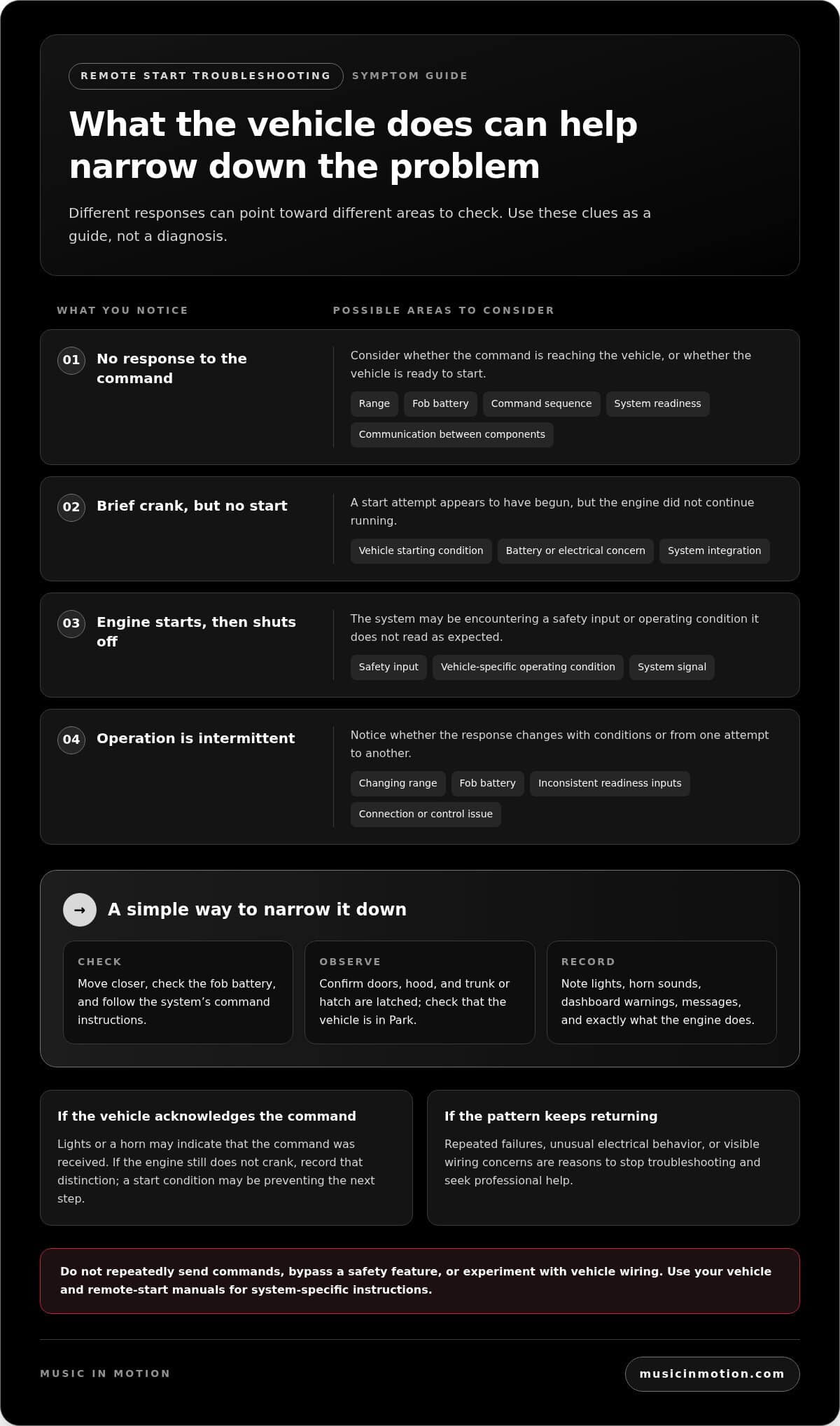
The vehicle’s response can help narrow down where to look, but it won’t confirm a specific fault. A system that gives no response behaves differently from one that cranks briefly or starts and then shuts off. Note exactly what happens, including lights, horn chirps, dashboard warnings, or messages. These clues can help distinguish a command or readiness issue from a possible starting or system-integration concern.
A single symptom can have several possible causes involving the vehicle, remote-start system, or installation. Use the table as a guide, not a diagnosis.
| What you notice | Possible areas to consider |
|---|---|
| No response to the command | Range, fob battery, command sequence, system readiness, or communication between components |
| A brief crank, but no start | A vehicle starting condition, battery or electrical concern, or an issue with system integration |
| Engine starts, then shuts off | A safety input, vehicle-specific operating condition, or a system signal that isn’t being read as expected |
| Operation is intermittent | Changing range, fob battery, inconsistent readiness inputs, or a connection or control issue |
When the vehicle does not respond at all
First consider whether the command is reaching the vehicle. Test from closer range, check the fob battery, and follow the lock or button sequence in the system instructions. Note whether the lights flash, the horn sounds, or another indicator acknowledges the request. Silence alone doesn’t prove the remote-start module has failed. The vehicle may not be ready, or the command may not have registered.
If the fob gets a response but the engine doesn’t crank, record that distinction. It suggests the vehicle acknowledged the command, but a start condition may still be preventing the next step. If available, compare the response from an authorized app or spare remote without changing settings. Keep each test consistent so you can tell whether anything changes.
When the engine cranks, starts, or shuts off unexpectedly
A brief crank differs from no response: the system appears to have initiated a start attempt, but the engine didn’t continue running. If the engine starts and then shuts off, a safety input or vehicle-specific operating condition may be involved. Don’t repeatedly send commands or try to defeat an interlock. Watch the dashboard and write down any warning light or message, including when it appears.
Intermittent operation is useful information, too. Note whether the problem occurs at certain distances, after the vehicle has been parked, or alongside a warning. A clear record helps a technician compare the symptom with the vehicle and system behavior. If the pattern keeps returning, professional integration of a remote-start system with the vehicle’s electronics and safety inputs is important to reliable operation.
Follow a safe troubleshooting sequence before changing settings
A consistent order makes troubleshooting a remote start that won’t work safer and more useful. Begin with checks that don’t require tools or access to the vehicle’s wiring. Use your vehicle and remote-start manuals for system-specific instructions. Button sequences vary, so don’t experiment with combinations intended for another system.
- Step 1: Verify readiness. Confirm the vehicle is parked securely, the transmission is in Park, and the doors, hood, and trunk or hatch are closed. Check the dashboard for a warning or message that could explain why remote start is inhibited.
- Step 2: Check the fob. Send the command as described in its manual. If you inspect the battery, follow the manual’s directions and use the specified battery type. Don’t force open the case or guess at a replacement.
- Step 3: Observe indicators. Watch and listen for a light flash, horn chirp, brief crank, or other response. If it’s safe and you’re familiar with the vehicle, compare remote-start behavior with ordinary starting. Stop if the vehicle displays a warning or behaves unusually.
- Step 4: Document the symptoms. Record how you sent the command, your approximate distance, what the vehicle did, and any dashboard warnings. Note recent battery, key, alarm, repair, or accessory changes as context, not proof of a cause.
Check batteries and indicators without opening wiring
Limit your checks to the fob and visible vehicle responses. Don’t disconnect the vehicle battery or remove trim as a general first step. Either action can complicate diagnosis or affect vehicle electronics. Avoid testing wires, probing connectors, or trying to reprogram a control module. If the basic checks don’t clarify the issue, preserve what you observed rather than dismantling components.
Most importantly, don’t bypass the hood, brake, neutral-safety, or immobilizer protections. These safeguards help prevent a start when the system detects a condition that may be unsafe or incompatible. A workaround can create a safety risk and obscure the original problem. Stop if a switch, wire, or module appears damaged, loose, or altered.
Record the details that help identify the fault
A short, specific record is more useful than repeated attempts with changing settings. Note whether you used a fob or authorized app, how far away you were, and whether the vehicle acknowledged the command. Record whether the engine never cranked, cranked briefly, started, or shut off, along with any warning light or message. Include recent changes without assuming they caused the symptom.
Vehicle-specific wiring and safety inputs are part of the bigger picture. The guide to professional remote-start installation explains why proper integration matters. If the cause appears to go beyond the fob or basic readiness checks, a system-level assessment is safer than trial-and-error wiring, repeated resets, or parts swapping.
When remote-start troubleshooting needs professional diagnostics
Stop DIY checks and seek professional help if remote-start attempts repeatedly fail, dashboard warnings appear, the vehicle shows unusual electrical behavior, or you notice damaged, loose, or altered wiring. These signs can point beyond a fob battery or simple readiness condition. Continuing to send commands or trying random resets may make the symptoms harder to assess.
- Repeated failed starts: The command is acknowledged, but the vehicle doesn’t start reliably.
- Warnings or messages: The dashboard displays a fault or the vehicle behaves differently than usual.
- Electrical changes: Lights, locks, or other electronics act inconsistently around a start attempt.
- Visible wiring concerns: A connector or wire appears loose, damaged, or modified.
Vehicle security, immobilizer, hood-pin, and control-module concerns can involve signals shared between the remote-start system and the vehicle. Identifying which component or input is involved may require diagnostic tools compatible with that vehicle and system. Replacing a fob battery or resetting a module might help in some cases, but neither is a guaranteed fix. Avoid trial-and-error parts swapping or electrical work.
Why interlocks, immobilizers, and wiring need careful diagnosis
Safety inputs are designed to block remote starting when the system detects a specified condition, such as an open hood. An immobilizer is an anti-theft system that helps prevent unauthorized engine starting, and it may also affect how an authorized start is recognized. A wiring or integration issue can complicate those signals. Bypassing an interlock can create safety risks; it isn’t a troubleshooting fix.
Professional assessment should consider the vehicle and system integration rather than treating every symptom as a failed remote. A warning could relate to the vehicle itself, a safety input, or communication between components. The vehicle safety systems guide provides more context on how vehicle technology works as an integrated whole.
What to share during a professional assessment
Useful details can help narrow the diagnostic path. Provide the vehicle’s year, make, and model, and say whether the remote-start system is factory-installed or aftermarket. Bring your symptom notes, including whether the engine cranks or starts, any warning messages, and which command method you used. Mention recent changes involving keys, the vehicle battery, an alarm, repairs, or added accessories. These details are clues, not proof of cause.
Professional installation considers the vehicle and remote-start system together, including relevant safety inputs and connections. If basic checks haven’t resolved the issue, talk with Music In Motion about remote-start system integration as a vehicle-specific next step.
Get a remote start that works reliably with your vehicle
If the same failure keeps returning, treat it as a system-level concern rather than cycling through resets or swapping parts. A fob may be only one part of the picture. Remote start depends on communication between the vehicle, the installed system, and its safety inputs, so a recurring symptom deserves a closer look at how those pieces work together.
Professional installation accounts for vehicle-specific electronics and the signals that permit or prevent a start. The goal is to understand how the system integrates with the vehicle, not to force it to operate by bypassing a safeguard. Music In Motion professionally installs remote-start systems and integrates vehicle electronics, providing a vehicle-focused option when you’re planning an installation or upgrade.
What a professional remote-start assessment can address
A system-level assessment can start with your symptom history and consider the installed remote-start system and relevant safety inputs together. The appropriate steps depend on the vehicle and system. A no-response condition, an engine that starts and shuts off, and intermittent operation may call for different checks, so there isn’t one reset or replacement part for every case.
Considering the complete integration helps avoid trial-and-error repairs. It keeps the focus on reliable operation and correct communication with the vehicle, rather than disabling protections to make a command work. The professional remote-start installation guide provides additional context on vehicle-specific planning and system integration.
Choose a clear next step for a persistent failure
Before discussing the issue, gather your notes and basic vehicle details. The year, make, and model, whether the system is factory-installed or aftermarket, and what happens during a failed attempt can help explain the problem. Include warning messages and recent changes to keys, the vehicle, or its electronics. You don’t need to identify the fault yourself; clear observations are enough to start the conversation.
Good troubleshooting means knowing where safe checks end. If the problem persists, repeated resets and parts swapping can add uncertainty without addressing the underlying integration issue. A professional assessment can evaluate the vehicle and remote-start system together without presuming a particular diagnosis or outcome.
If your remote start continues to act up, contact Music In Motion to discuss professional remote-start installation and system integration for your vehicle. Share your notes and vehicle details so the conversation can focus on the symptoms and the system’s relationship with your vehicle.
Make your next start more dependable
A remote start should make your routine easier, not leave you guessing each time you press the button. If the problem keeps returning, use what you’ve observed to move from trial and error toward a clear, vehicle-specific plan. Your notes can turn an inconsistent symptom into a more productive conversation about the system and its integration.
Music In Motion brings vehicle-electronics expertise to remote-start installation, with attention to how the system fits the vehicle. Whether you’re addressing a persistent issue or planning a remote-start system for your vehicle, the goal is an installation suited to your needs and compatible with the vehicle’s electronics.
For a next step, talk with our team about remote-start installation and system integration. We can discuss a vehicle-specific installation that works with your vehicle’s electronics.
Frequently Asked Questions
Is a dead key fob battery the most common reason remote start stops working?
A weak fob battery is a common, easy-to-check possibility, but it isn’t the cause of every remote-start problem. When troubleshooting a remote start that won’t work, replace the battery only as the fob manual directs and use the specified type. If a spare remote works from the same spot while the usual fob doesn’t, that comparison is useful, though it doesn’t confirm the exact fault.
Can a check-engine light stop remote start from working?
Some vehicles and remote-start systems inhibit remote starting when the check-engine light is on or a related fault is stored, but behavior varies. The light may also point to a separate vehicle issue rather than the remote-start equipment. Note whether it stays on, flashes, or appears with a message, and whether normal starting changes. Don’t erase diagnostic codes to test the system; persistent warnings call for proper vehicle diagnosis.
Why does my car remote start and then shut off?
The engine may shut down because a safety input is detected, a vehicle fault affects operation, or the system follows a vehicle-specific condition. Note whether the engine catches, how long it runs, and whether shutdown follows a dashboard alert. Check your manual for expected remote-start behavior. If the engine also stalls during normal driving or starting, treat that as a vehicle concern, not just a remote-start setting.
Can a low car battery keep remote start from working?
Low voltage in the vehicle battery can interfere with cranking or electronic operation, but remote-start failure alone can’t identify the battery’s condition. Compare whether the engine turns over more slowly than usual with the key or start button, or whether other electronics behave differently. If you notice either change, avoid repeated remote-start attempts and arrange suitable battery and vehicle-system testing to distinguish a weak battery from another fault.
Does remote start work if the hood is open or a door is unlocked?
Remote start often requires the hood to be fully closed and the transmission to be in Park; door-lock requirements depend on the vehicle and system. An unlocked door alone doesn’t prove there’s a fault. Check each latch and the owner’s manual for the specific start conditions instead of guessing based on another vehicle’s behavior. Never hold down or disconnect a hood switch to override the system, since that removes a protection rather than fixing the cause.
What should I do if my remote start works intermittently?
Compare like with like: use the same command method and note your location, approximate distance, and the vehicle’s response each time. Also record whether the issue follows one remote or occurs with an authorized app or spare. A pattern can help distinguish an inconsistent command from a vehicle-side symptom, though it won’t identify a component by itself. If failures persist, share your notes and vehicle details during professional diagnosis rather than repeatedly resetting the system.